
Plain White HyperOS Theme – Clean White Look with Soft Blue Icons
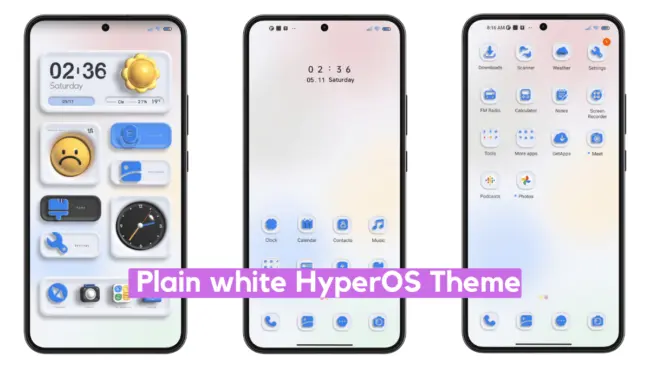
Plain White is a light, minimal theme by the designer TOO. It keeps HyperOS almost entirely white, with soft blue icons and a few rounded widgets.
It is a 23.66 MB package.
Plain White HyperOS Theme for Xiaomi, Redmi and POCO
The lock screen uses a thin, spaced-out clock on a plain white background. The home screen adds a widget stack with a clock, weather, a round analogue clock and a cheerful face sticker, while app icons stay small, flat and blue.
What Plain White changes
- Lock screen: a thin, spaced-out clock on white.
- Home screen: rounded widgets with a clock, weather and an analogue clock.
- App icons: small, flat blue icons on white.
Theme Preview
The preview below comes from the theme listing and shows the home screen widgets, the lock screen and the app icon page.
Plain White Xiaomi Theme Details
What the previews show
Plain White has a single official preview image, which shows three phone screens side by side. They suggest a white and soft lilac look, with a clock and round widgets on the lock screen and light icons on the home screen.
Because only one preview exists, we cannot describe the control center, recents or dialer. Check the store listing on your phone before applying if those screens matter to you.
Theme details
Everything to check before you install
How we reviewed it
We have not run Plain White on our own phone, so this page is preview-based: it only describes what the official preview screens and the theme listing show.
Pros, cons and our verdict
What we like
- Clean, bright look
- Friendly rounded widgets
- Soft blue icons stay consistent
Keep in mind
- Not tested hands-on
- Very bright for night use
Judging by the previews, Plain White suits anyone who wants a calm, airy white phone.
Get the Plain White HyperOS Theme
Ready to try it? Plain White (23.66 MB) opens in the official Themes app when you tap the store button below on your phone.








0 comments